Tuesday, February 15, 2011

Tuesday, February 8, 2011
Android Development In Visual Studio
Introduction

vs-android is intended to provide a collection of scripts and utilities to support integrated development of Android NDK C/C++ software under Microsoft Visual Studio.
Currently vs-android only works under Visual Studio 2010. Earlier versions lack the MSBuild integration with the C/C++ compilation systems.
The only required component is the Android NDK. Neither Cygwin, Java, nor the full Android SDK are needed to compile and link C/C++ code.
Features
- Compile and link Android C/C++ projects within Visual Studio.
- Integrated development, no makefiles. Works as another 'Platform' type.
- Android settings co-exist within the same VS projects as other platforms.
- Supports static library projects, and links them in if marked as project dependencies.
- Intellisense and 'External Dependencies' correctly pull in Android NDK headers.
- Cygwin install is not required.
- Around twice as fast as using ndk-build under Cygwin. For full rebuilds, and incremental changes.
- Ctrl-F7: compile single file functions, has no dependency checking wait.
- Supports invoking ant after linking, such that you end up with a packaged ready-to-deploy .apk file.
To download the latest version click here
Saturday, February 5, 2011
Saturday, January 29, 2011
Tutorial: Android & Mind Games
Developing a game on android is a whole new ball game i.e. very different from making database apps. You have to know the logic behind every move. The flow of the program is complex and you also have to keep in mind about the memory issues if necessary.
Mind games are great mind-teasers as well as thrilling to the general smartphone users. Ever wondered what are the essentials that a typical mind game program is comprised of?
We usually have the following: Random Numbers, Timer, and MotionEvent.
Here is a source code for a little game on Android that i named "Reflexo", as it measures one's reflexes :)
main.xml
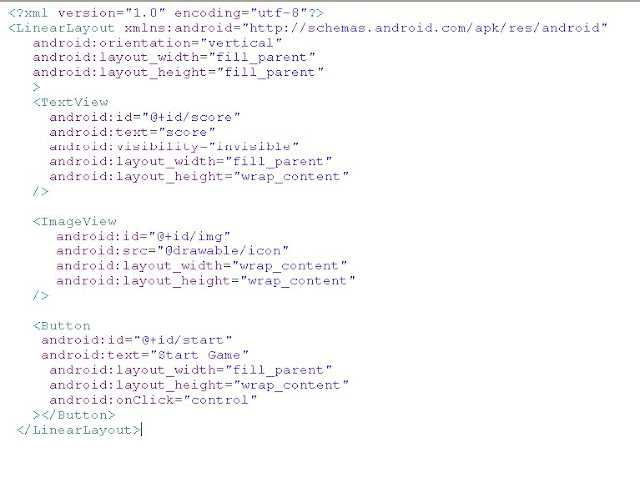 reflexo.java:
Mind games are great mind-teasers as well as thrilling to the general smartphone users. Ever wondered what are the essentials that a typical mind game program is comprised of?
We usually have the following: Random Numbers, Timer, and MotionEvent.
Here is a source code for a little game on Android that i named "Reflexo", as it measures one's reflexes :)
main.xml

package com.games.reflexo;
import java.util.Random;
import android.app.Activity;
import android.os.Bundle;
import android.os.CountDownTimer;
import android.view.MotionEvent;
import android.view.View;
import android.view.View.OnTouchListener;
import android.widget.Button;
import android.widget.ImageView;
import android.widget.TextView;
public class Reflexo extends Activity {
/** Called when the activity is first created. */
int score = 0;
int left = 0;
int top = 0;
int right = 0;
int bottom = 0;
Button startGame;
ImageView imgView;
TextView scoreDisplay;
MyCount counter;
int length = 10000;
@Override
public void onCreate(Bundle savedInstanceState) {
super.onCreate(savedInstanceState);
setContentView(R.layout.main);
startGame = (Button)findViewById(R.id.start);
imgView = (ImageView)findViewById(R.id.img);
scoreDisplay = (TextView)findViewById(R.id.score);
startGame.setOnClickListener(new View.OnClickListener(){
public void onClick(View v)
{
startGame.setVisibility(0);
counter.start();
}
});
imgView.setOnTouchListener(new OnTouchListener(){
public boolean onTouch(View v,MotionEvent e) {
if (e.getAction() == MotionEvent.ACTION_DOWN)
{
score++;
}
return true;
}});
counter = new MyCount(length, 300);
}
public class MyCount extends CountDownTimer
{
public MyCount(long millisInFuture, long countDownInterval) {
super(millisInFuture, countDownInterval);
}
public void onFinish() {
scoreDisplay.setVisibility(1);
scoreDisplay.setText("Score:" + score);
}
public void onTick(long millisUntilFinished) {
Random randomNum = new Random();
left = randomNum.nextInt(200);
top = randomNum.nextInt(400);
right = randomNum.nextInt(200);
bottom = randomNum.nextInt(400);
if (millisUntilFinished / 100 % 2 == 0)
{
imgView.setPadding(left, top, right, bottom);
imgView.setVisibility(View.VISIBLE);
}
else
{
imgView.setVisibility(View.INVISIBLE);
}
}
}
}
Subscribe to:
Posts (Atom)